

If you are an individual Plaud app user looking to access your own recordings programmatically, see Plaud App for the MCP server and CLI options.
Architecture
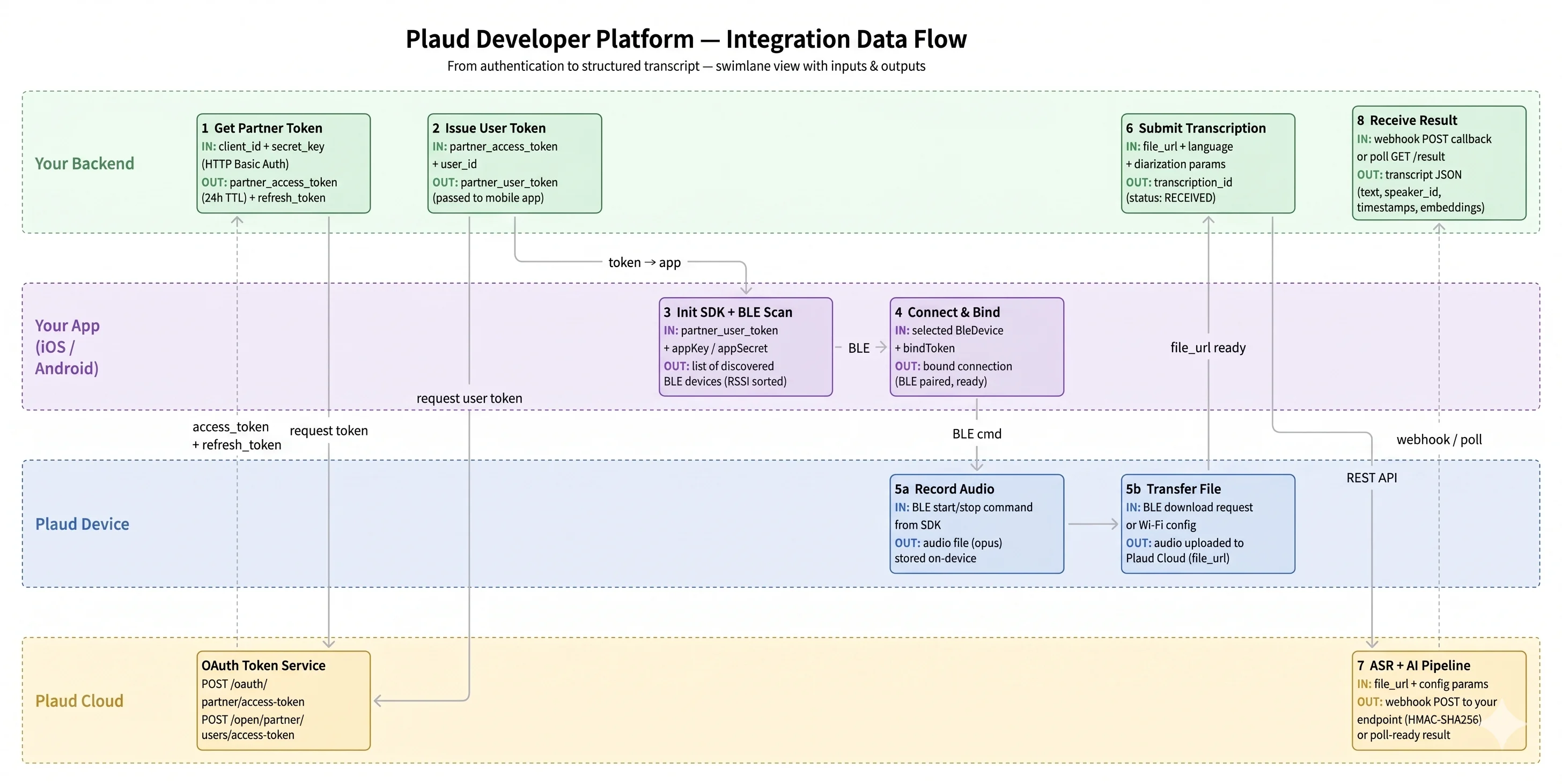
How it works
Request access
Visit dev.plaud.ai and fill out the contact form to request developer access. Once your request is reviewed, you’ll receive instructions to sign up and create an Embedded SDK application. You’ll receive a Client ID and Secret Key — the Secret Key is shown once, so copy it immediately.When creating the application, select your target region (
us or jp; eu and sg coming soon). The Client ID, Secret Key, and API Key are scoped to that region, and every subsequent call must go to the matching platform-<region>.plaud.ai host.Choose your setup
Two paths to get started:Starter App — Clone a complete iOS or Android project with all screens preconfigured. Drop in your Client ID and run. See Starter App for details.SDK Only — Add the SDK directly to your existing project via Swift Package Manager (iOS) or Maven (Android) and build your own UI.
Obtain a per-user access token
Exchange your credentials server-side for the per-user token that the SDK will be initialized with. First, use Basic Auth with
client_id:secret_key to obtain a partner token, then call POST /open/partner/users/access-token on platform-<region>.plaud.ai with a user_id in the body to receive the per-user JWT. Keep both exchanges on your backend — the per-user JWT is the only credential that should reach the device. The SDK exposes setUserAccessToken(...) for rotation, so plan to cache and refresh on your backend rather than treating the token as long-lived.Initialize and pair a device
Initialize the SDK with the per-user access token from the previous step and your
platform-<region>.plaud.ai host, then start a scan. The SDK discovers nearby Plaud devices, negotiates the BLE or Wi-Fi connection, and handles the full pairing handshake. Your app receives callbacks for device discovery, connection state changes, and file transfer progress.Record and transfer audio
Once paired, your app controls recording sessions and receives a callback when audio is ready. The SDK returns the raw audio file to your backend. From there, submit it to Plaud’s ASR endpoint for full control over timing, params, and retries — or route it to any third-party transcription provider. The platform is open; you are not locked into Plaud’s AI pipeline.
Devices for every workflow
Plaud Note Pro
Designed for phone calls and conversation-heavy workflows.
| Battery | 30–50 h (endurance mode) |
| Microphones | 4-mic array |
| Display | AMOLED |
| Connectivity | Dual-band Wi-Fi + Bluetooth |
| Mode | Smart dual-mode (calls + in-person) |
Plaud NotePin S
Designed for hands-free, on-the-go use in field work, healthcare, and retail.
| Battery | 20 h |
| Weight | 0.81 oz |
| Wearing | Magnetic pin, clip, lanyard, or wristband |
| Connectivity | Dual-band Wi-Fi + Bluetooth |
| Optimized | In-person conversations |
Transcription API
Plaud’s ASR was trained specifically for offline audio data, delivering accuracy even with background noise, overlapping speakers, and distance from mics.Speaker Diarization
Industry-leading speaker diarization built into the Transcription API. Automatically identifies and labels each speaker with word-level timestamps.
112 Languages
Support for 112 languages with published accuracy benchmarks by language, scenario, and environment.
Enterprise-grade by default
Privacy and security are built into the foundation, not added on.Global compliance
Plaud meets global compliance standards including SOC 2 Type II, HIPAA, GDPR, EN18031, ISO 27001, and ISO 27101.
Encryption in transit & at rest
Data is encrypted on-device. In transit, all data is encrypted using HTTPS/TLS 1.2 or above. At rest, data is encrypted using AES-256.
Multi-region cloud
Plaud processes and stores data in regional AWS data centers in the US, Europe, Singapore, and Japan.
Key concepts
Credentials
Create a client in the Portal to receive a
client_id and secret_key. An api_key is optional — issue one if you want to authenticate directly with an API key and monitor usage separately.Transcription
Submit
file_url and processing params authenticated with X-Client-Id + X-Client-Api-Key headers. Result delivered via polling.Frequently asked questions
Do my users need a Plaud App subscription to use the SDK?
Do my users need a Plaud App subscription to use the SDK?
No. With the SDK, Plaud acts as infrastructure for your product — you pay for transcription usage and the number of connected devices, and you own the product experience and pricing for your app.
Why not build a phone recording app ourselves?
Why not build a phone recording app ourselves?
Phones are not designed for capturing in-person conversations, nor can they capture phone calls without significant effort. They also drain the phone battery, create an awkward end-user experience, and lack built-in state-of-the-art transcription. Plaud devices and the SDK address all of this.
Do I need to have a mobile application?
Do I need to have a mobile application?
Yes. The Plaud Embedded SDK integrates directly into your iOS or Android application. Your app handles device pairing, recording controls, and user experience — Plaud provides the SDK, transcription API, and a starter app to build from.
What languages are supported?
What languages are supported?
112 languages, with published accuracy benchmarks by language, scenario, and environment.
Are there usage limits on the Free tier?
Are there usage limits on the Free tier?
Free tier accounts have starter limits on monthly transcription minutes and connected devices per client. These are intended for prototyping and evaluation. Contact us through the developer console to upgrade to a production tier with raised or unmetered limits.